Skip to content

Getting started

Upload or record audio, video and text, transcribe it across 93 languages with speakers identified, then summarize and analyze it with AI.

Updated View as MarkdownAsk ClaudeOpen in ChatGPTllms.txt

Getting started with Speak AI

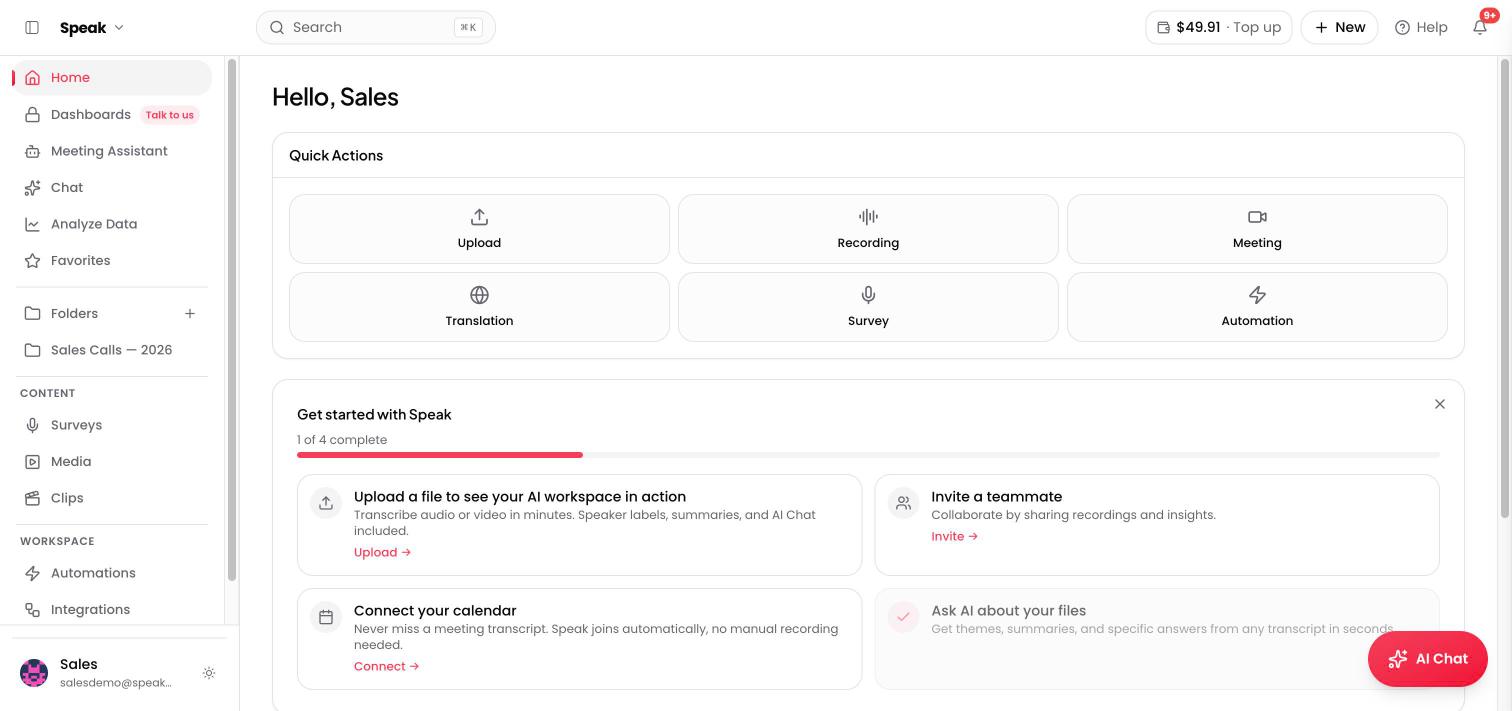
The Speak AI home screen: quick actions and getting-started checklist

What is Speak AI?

Speak AI is a platform for transcription and analysis. Upload or record audio, video, and text, and Speak will automatically transcribe it in 70+ languages, identify speakers, and generate summaries, insights, and action items using AI.

It’s built for anyone who works with recorded content: meetings, interviews, podcasts, research, customer calls, lectures, and more.

Your first 5 minutes

1. Upload a file or start recording

From your dashboard, click Upload to add an audio or video file (MP3, MP4, WAV, and many more formats supported). You can also use the built-in Recorder to capture audio directly, or connect the Meeting Assistant to auto-join your Zoom, Google Meet, Microsoft Teams, or Webex calls.

2. Wait for transcription

Speak processes your file automatically. Most files under 30 minutes are transcribed in just a few minutes. You’ll see a notification when it’s ready.

3. Explore your transcript

Once transcribed, you can:

  • Read and search the full transcript with timestamps
  • Edit speakers to label who said what
  • Click any line to jump to that moment in the audio/video

4. Use AI Chat

This is where Speak gets powerful. Open AI Chat and ask anything about your recording:

  • “What are the key takeaways?”
  • “List all action items with owners”
  • “Summarize this in 5 bullet points”
  • “What questions were asked?”

AI Chat works with Claude, Gemini, and GPT, so you get multi-model AI analysis.

Key features to explore next

  • Meeting Assistant - Auto-join and record your calls
  • Folders - Organize recordings into projects or topics
  • AI Insights - Automatic keywords, categories, and sentiment analysis
  • Embeddable Recorder - Collect audio from others (interviews, surveys, feedback)
  • Automations - Run AI Chat prompts automatically on new uploads
  • API and Integrations - Connect with 5,000+ tools via Zapier, or use the Speak API directly

Plans

Speak AI offers a free trial with up to 1 hour of transcription (no credit card required). When you are ready for more transcription, AI Chat, and team seats, upgrade to Pro. See current plans and pricing at speakai.co/pricing.

Quick start guide

Looking for a complete guide to getting started with Speak AI? Check out our comprehensive Getting Started with Speak AI article.

It covers everything you need in your first 5 minutes: uploading files, exploring transcripts, using AI Chat, and key features to try next.

Use quick actions in the dashboard

On the Speak Dashboard, there are four Quick Action buttons to choose from: New Upload, New Text, New Recorder or Live Record and more.

Pressing any one of these buttons will direct you to their relevant pages.

The New Upload button opens the Upload File window:

The New text button will start an all-new text note:

The New recorder button will start an all-new recorder:

The Live Record button will start an all-new audio or video recording:

What can I use Speak AI for

You can use Speak for everything from sensitive research to personal analysis and marketing.

We have clients from various industries who use Speak to further their business goals but also take advantage of our platform to brainstorm, analyze speech habits, find trends in their content strategy or to conduct competitor research.

Feel free to visit our resources section to explore the power of Speak.

Is Speak AI the same as Speak.com

No, they are different products

Speak AI (speakai.co) and Speak (speak.com) are completely separate companies with different products.

Speak AI (speakai.co) - That’s us.

Speak AI is a platform for transcription and analysis. We help you:

  • Transcribe audio and video in 70+ languages
  • Identify speakers automatically
  • Generate AI summaries, action items, and insights
  • Analyze meetings, interviews, podcasts, research recordings, and more

If you work with recorded audio or video content and want to turn it into searchable, analyzable text with AI insights, you’re in the right place.

Speak.com

Speak.com is a language learning platform focused on helping people practice speaking foreign languages through AI conversation. If you’re looking to practice English or another language, that’s a different product at speak.com.

Want to try Speak AI?

If you’re curious about what Speak AI can do, try uploading an audio or video file from your dashboard. We’ll transcribe it and show you the AI analysis features. It’s free to get started.

AI Agents: getting started

What are AI Agents?

Speak AI Agents are conversational AI assistants you can deploy to automate interviews, collect feedback, answer questions, and more. They can interact via voice (phone or web), video (avatar), or text chat.

Types of agents

  • Voice agents: Conduct phone or web-based voice conversations. Users call a phone number or click a link to talk.
  • Video agents: Avatar-based conversations with a visual AI presenter.
  • Chat agents: Text-based conversations embedded on your website.

Setting up your first agent

  1. Go to agents.speakai.co
  2. Click Create Agent
  3. Choose your agent type (voice, video, or chat)
  4. Configure your agent:
    • Name and personality: Set the tone and style of conversation
    • Welcome message: What the agent says first
    • Instructions: Guide the conversation flow
    • Knowledge base: Upload documents, JSON, or website URLs for the agent to reference
    • Structured outputs: Define data fields to extract from conversations
    • Custom vocabulary: Add industry-specific terms
    • Topics to avoid: Set boundaries for the conversation
  5. Save and publish your agent

Deploying your agent

Once created, you can deploy your agent in several ways:

  • Direct link: Share a URL that opens the agent conversation
  • Phone number: Assign a Twilio phone number so users can call in
  • Website embed: Use an iframe or script tag to embed the agent on your site
  • QR code: Generate a QR code that links to your agent

After conversations

Every conversation is automatically:

  • Recorded (audio)
  • Transcribed
  • Analyzed for structured outputs you defined
  • Available for review in the conversation audit dashboard

The agent also identifies knowledge gaps and suggests FAQs based on questions it could not answer well.

Use cases

  • HR phone screening: Candidates call or click a link to complete structured interviews
  • Customer feedback: Collect voice-of-customer insights at scale
  • Patient testimonials: HIPAA-compliant interview collection via QR code
  • Employee documentation: Guide managers through structured incident reporting
  • Sales qualification: Pre-qualify leads with intelligent conversation

AI Agents is a separate product from the core Speak AI transcription platform. Contact our team to learn more about pricing and setup: Book a consultation.

For more details, visit speakai.co/ai-agents.

Need help? Reach out to us anytime through this chat, or explore our other help articles.

New to Speak AI? Start here. Create your account, upload your first recording, and see a transcript with insights in your first five minutes. Speak AI transcribes in 93 languages, separates speakers automatically, and turns what was said into answers you can search, share, and act on.

Evaluating Speak AI for a team? Book a demo and see your own recordings analyzed.

Navigation

Type to search…

↑↓ navigate↵ selectEsc close