
A branch splits one automation into two paths and sends each file down the path that matches it. Score a call in one step, then email the rep when the score is low and file it away when it is not, without building two automations that duplicate the first half.
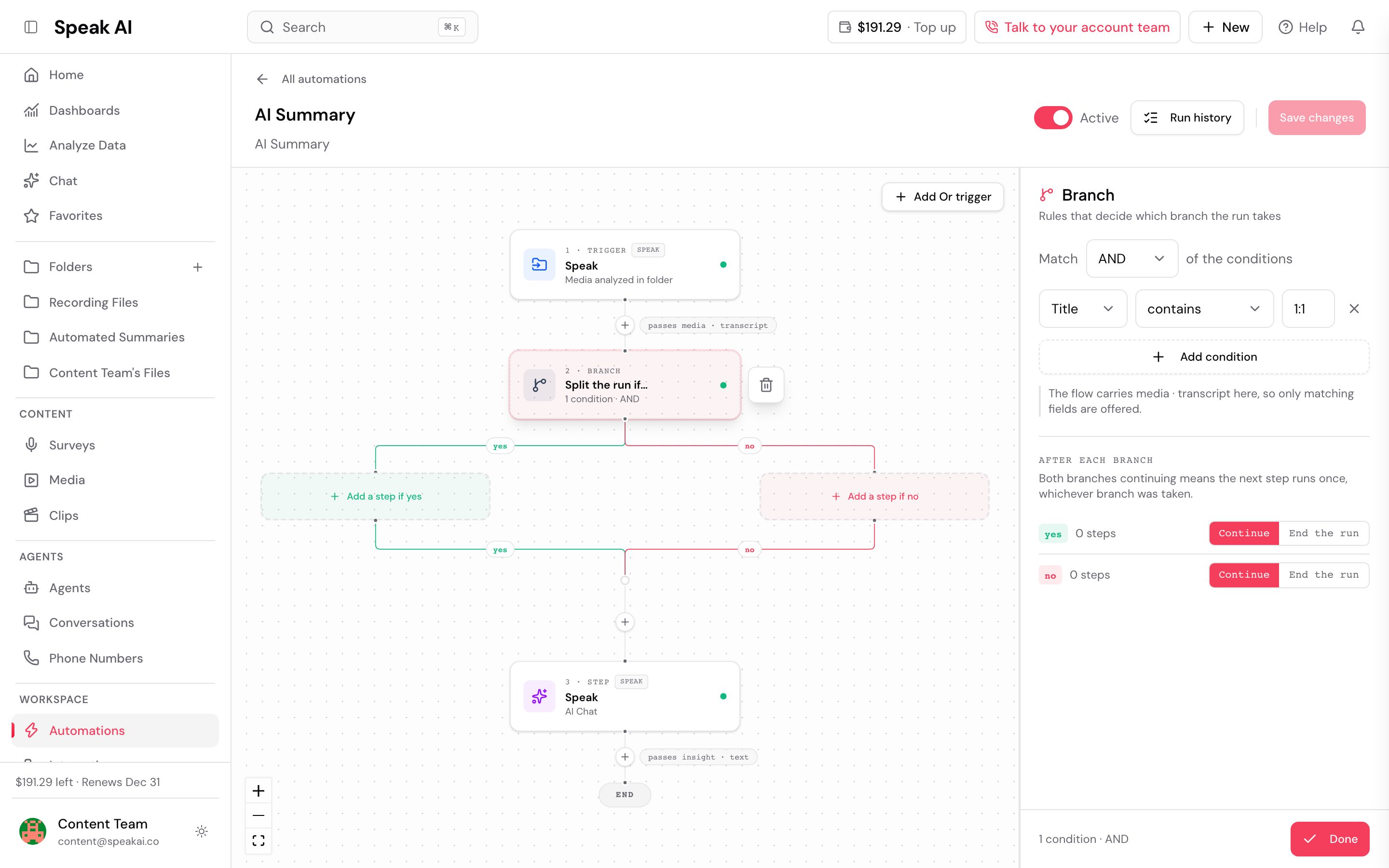
A filter and a branch answer different questions. A filter decides whether the automation runs at all. A branch decides which steps run once it already has.
How do you add a branch?
- Open the automation on its canvas.
- Select the + where you want the split, then choose Branch.
- Select the branch card and set its rules in the panel on the right. The card reads Split the run if…, and until you set the rules it shows Set the rules in the panel.
- Add at least one step to a path. An empty path shows Add a step if yes or Add a step if no, and Add a step to this branch adds to the path you are on.
The rules use the same editor a filter uses, so a branch can test a media property, a tag, or one of your custom fields.
A branch placed after a Speak AI Chat step offers that step’s Answer at the top of the field list, followed by the media’s own properties and your custom fields. Branch on a field the AI step filled in by picking the field, not the answer.
What happens after each branch?
Open the branch card and look at After each branch. Each path is set to one of two things:
- Continue, the default. The path rejoins the main line and the steps below the branch run.
- End the run. Nothing after the branch runs for a file that took that path.
The panel states the consequence: “Both branches continuing means the next step runs once, whichever branch was taken.” So a step placed below a branch does not run twice.
Can a branch sit inside another branch?
Yes, up to three levels deep, and a nested branch has to be the last step on the path it sits on. Speak refuses to save anything else and tells you which rule you hit:
- “Branches can be nested three deep at most. Move the deepest branch out”
- “A branch inside a branch has to be the last step on it. Move the steps after it below the whole branch”
Why will Speak not save my branch?
Save stays disabled while a branch is incomplete, and the reason appears beside it:
| What you see | What to change |
|---|---|
| “Set the rules on every branch before saving” | A branch card has no rules yet. |
| “This branch has no steps on either side, so both paths do the same thing. Add a step to one of them, or set a branch to end the run” | Put a step on one path, or set a path to end the run. |
| “Both branches end the run, so the steps after them can never run. Remove them, or set a branch to continue” | Delete the steps below the branch, or set one path to continue. |
| “Every path through this branch ends, so the steps after it can never run” | Same problem, reached through a nested branch. |
Speak also blocks you from deleting a step whose output a later step still reads, and names the step to fix first by its action, for example “Speak AI Chat reads this step’s output. Update it first.” Clear the token from that later step, then delete the earlier one.
Can a scheduled automation branch?
No. A scheduled automation processes a batch of media in one run, so a branch would send every file in the batch down the same path. Saving one returns:
“A scheduled automation runs a batch of media at once, so a branch would send every file down the same path. Remove the branch, or switch this automation off a schedule.”
Use an instant trigger instead, so each file is judged on its own.
How do you tell which path a run took?
Open the run in the automation’s run history. The branch step records its outcome as “Conditions met, took the yes branch” or “Conditions not met, took the no branch”, and every step on the path that was not taken is marked skipped rather than failed.
Read the per-step list rather than only the run’s overall status. A filter that stops one path marks the whole run as stopped even when the other path finished its work.
Can a step on one branch feed a step after it?
A step inside a branch publishes its answer as a token like any other step, and the token picker marks it “only if this branch runs”. If the run takes the other path, that step never produced anything, so the token resolves to nothing and the later step still runs. Put the step that depends on an answer on the same path that produces it.
The fastest way to reach us is the live chat in the app (the chat bubble in the bottom corner). You can also email success@speakai.co.
Want a hand setting this up? Book a free consult and we’ll do it together on your account.
Related: Automations · Filters · Actions · Triggers