
What exclude rules do
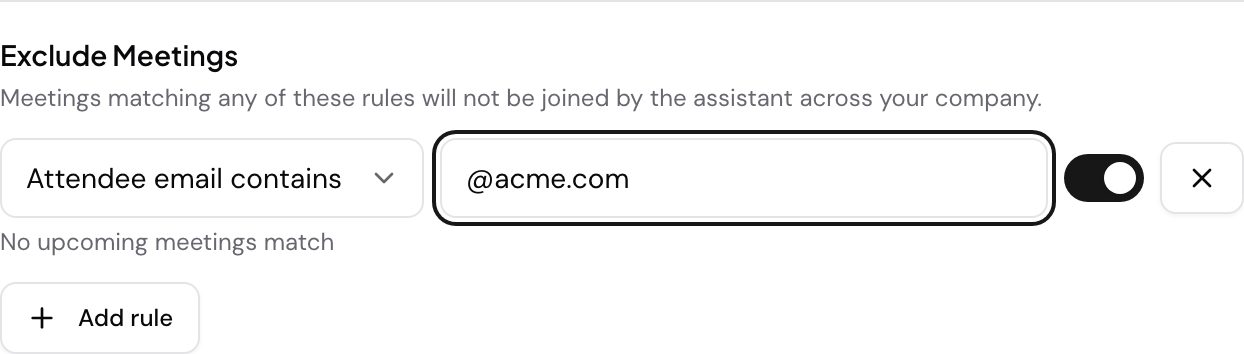
Exclude rules let an admin stop the Speak AI Meeting Assistant from joining specific meetings across the whole company. This is useful when you never want the assistant to join a particular organization’s calls, or any meeting a certain person schedules.
Who can set them
Exclude rules are a company-wide setting, so they are managed by team admins who have the Global Settings permission. They live in Assistant Preferences, on the Global Settings tab, under Exclude Meetings.
Company-wide rules versus your own
Assistant Preferences has two places that keep the assistant out of a meeting, and they do different jobs:
- Global Settings > Exclude Meetings applies across your whole company. It needs the Global Settings permission.
- Exclude Join Conditions applies to your own assistant only. It matches on Meeting titles or Attendees Emails, and it needs the Exclude Meetings permission.
Use Global Settings when nobody at your company should record a given organization. Use Exclude Join Conditions when it is only your own calendar you want to filter.
Add an exclude rule
- Open Assistant Preferences on the Meeting Assistant page and select Global Settings.
- Find the Exclude Meetings section and select Add rule.
- Choose what the rule matches on from the first dropdown:
- Attendee email contains - matches part of an address, so
@acme.comcatches everyone at that company - Attendee email is - matches one exact address, for example
scheduling@acme.com - Meeting link contains - matches part of a meeting URL, for example
speakai.zoom.us
- Attendee email contains - matches part of an address, so
- Enter the value to match. As you type, a live preview shows how many upcoming meetings the rule would exclude, or No upcoming meetings match if it catches nothing.
- Each rule has its own toggle, so you can turn a rule on or off without deleting it. The X beside a rule removes it.
- Select Save.
A note on Google Meet links
Meeting-link rules work well for Zoom. Google Meet links do not identify an organization, so a Google Meet link would only match a single meeting. To exclude a whole company on Google Meet, use an attendee email or email domain rule instead.
See what was excluded
The Excluded tab lists the meetings the assistant skipped and the reason each one was excluded, so you can confirm your rules are doing what you expect.
If a meeting still gets recorded
Message us on live chat in the app or email success@speakai.co.
Evaluating Speak AI for a team? Book a demo and see your own recordings analyzed.
Related: Meeting Assistant · Auto-join